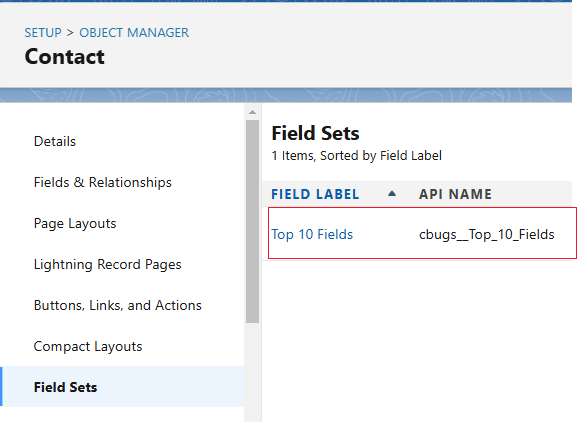
Note: To retrieve multiple field set once you can add more members.
Interview Question on this Topic:
Is wildcard characters supported to retrieve FieldSets?
What is the use of FieldSets?
How to use FieldSet in Lighting Component?
What is FieldSet in Salesforce?
A field set is a named group of fields on an object. Developers use field sets in Visualforce pages and Apex so admins can change which fields appear without touching code. Retrieving a field set lets you version it or move it between orgs.
Steps to retrieve it in VS Code
Open your Salesforce DX project in VS Code and authorize your org with SFDX: Authorize an Org.
Open manifest/package.xml, or create the file, and paste the XML shown above.
Right-click package.xml and choose SFDX: Retrieve Source in Manifest from Org.
When the command finishes, open the folder force-app/main/default/objects/ObjectName/fieldSets to see the retrieved files.
Each member is written as ObjectName.FieldSetApiName. The cbugs__ prefix in the example is a namespace. In your own org, without a managed package namespace, leave it out: Contact.Top_10_Fields.
Retrieve it with the Salesforce CLI
If you prefer the terminal, run one of these commands from your project folder:
sf project retrieve start --manifest manifest/package.xml
sf project retrieve start --metadata FieldSet:Contact.Top_10_Fields
Where the files are saved
After a successful retrieve, the files are placed inside your project, for example in force-app/main/default/objects/Contact/fieldSets/Top_10_Fields.fieldSet-meta.xml.
Common problems and fixes
Entity of type FieldSet cannot be found: check the spelling and the API name of the member, and make sure you are authorized to the correct org.
Nothing was retrieved: run sf org list to confirm the default org, and check that the component actually exists there.
API version: the examples use version 62.0. You can use a higher version if your org supports it.
FAQ
Do I need the namespace prefix? Only if the field set belongs to a managed package. For a field set you created in your own org, use Object.FieldSetName.
Can I retrieve more than one field set? Yes. Add one members line for each field set.