How to bypass validation rule using custom setting

Topic: Bypass salesforce validation rule for given users using hierarchical custom setting.

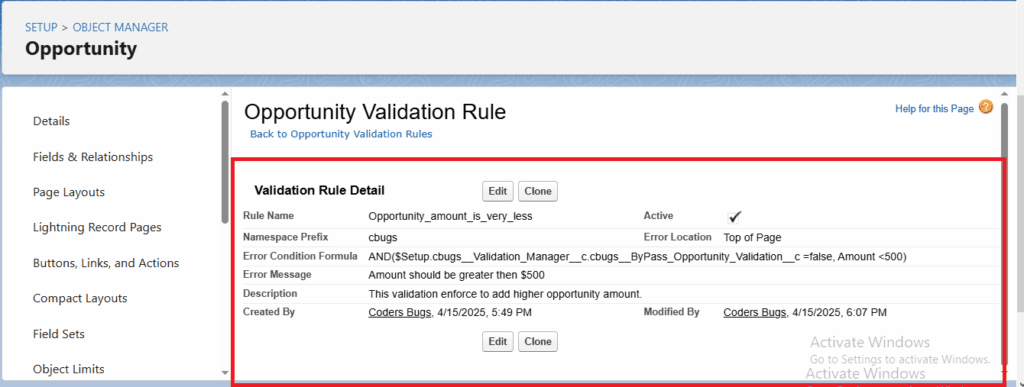
Scenario: On opportunity we have validation which force to add amount greater then $500, lets see how to bypass this for specific or all users.

Solution: Create new hierarchical custom setting with check box field and use the field value to bypass you validation rule.

Note: If the default organization-level value of your checkbox field is set to true, the validation will be bypassed for all users..

Bypass validation using custom setting

See in action

Steps to build the bypass

  1. In Setup, open Custom Settings and click New. Choose the type Hierarchy and name it, for example Validation_Settings__c.
  2. Add a checkbox field, for example Bypass_Validation__c.
  3. Click Manage and create a value for your organization (the default), a profile, or a single user. Check the box where the bypass should apply.
  4. Open the validation rule on Opportunity and add the setting to the formula.

Validation rule formula

AND(
    Amount <= 500,
    NOT($Setup.Validation_Settings__c.Bypass_Validation__c)
)

The rule fires when the amount is 500 or less, unless the bypass box is checked for the running user. Use the same pattern in any validation rule by adding the NOT condition.

How the hierarchy works

Salesforce looks for a setting for the user first, then for the profile, then for the organization default. A user value overrides a profile value, and a profile value overrides the default. If the organization default is checked, the validation is bypassed for everyone who has no value of their own.

Other options

  • Custom permission: assign it through a permission set and use $Permission.Bypass_Validation in the formula. It is easier to audit who has the bypass.
  • Custom metadata: good when the setting should be deployable between orgs.

FAQ

Can I use the same setting in Apex?
Yes. Read it with Validation_Settings__c.getInstance().Bypass_Validation__c.

Is a bypass safe in production?
Keep it limited to specific users or a data load, and switch it off after use.

Leave a Reply