Here are some common mistake or reasons of not getting security scan report for salesforce package .
When your product get complete you send that product for security review , security review is critical process but not for us we use https://security.secure.force.com/security/tools/forcecom/scanner for submitting our package for security review .
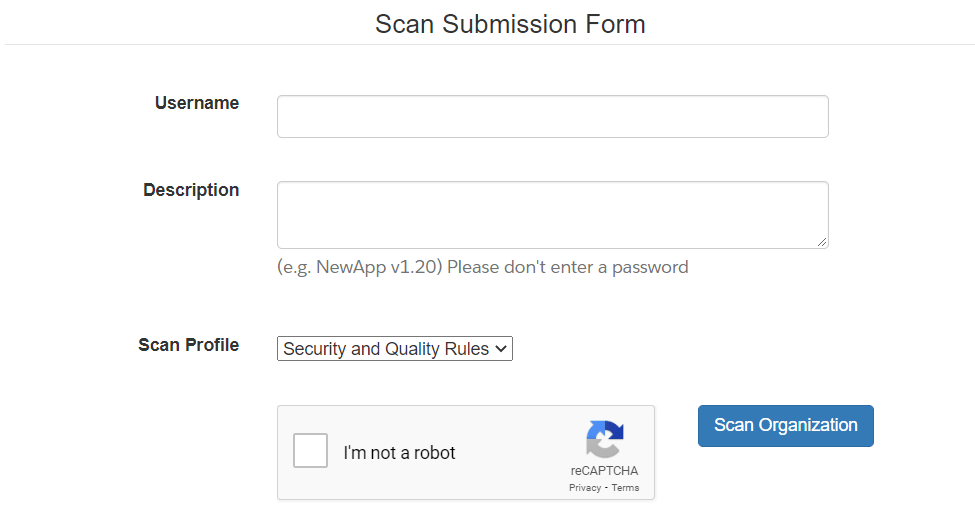
Once you send your code for security review then within few minutes you get the mail that your Job for security scan is added In the Queue.
And if all goes well then you will get security scan report within a hour .
In some cases it may take more then 5-hr to generate report .
If it take’s more 5-hr then here are some reasons for behind that.
Reasons for not getting security scan report :
Reasons 1 :
The security scan report E-mail contains attachment file of html file , check if your organization allows you receive an E-mail with this type of attachment’s .
Reason 2 :
Go through this doc before you submit your solution for security scan.
If you found any other solution then please share ,Thank you…
How the security scan works
When you submit a package for the scan, the job goes into a queue. You first get an email that the job was queued, and later an email with an HTML report as an attachment. Most scans finish within a few hours, but a busy queue can make it take longer.
If the report does not arrive
- Check your spam and junk folders, and the quarantine of your company mail system.
- Confirm that the email address used for the job is correct and can receive emails with an HTML attachment. Some mail systems remove such files.
- Check that your email domain allows messages from Salesforce.
- Make sure the package you submitted is valid and finished uploading. A broken or empty package may not produce a report.
- Wait a full day before you submit again, because repeat submissions can slow the queue.
- Read the official guidelines for the scanner before you submit.
Updated tools
Salesforce has changed its security review tools over the years, and the page named in the post may not be the current one. Today, developers can run Salesforce Code Analyzer on their own machine to find security and quality problems before submitting. AppExchange partners use the Partner Security Portal. Check the current Salesforce documentation for the tool that applies to you.
FAQ
Can I scan without submitting to Salesforce?
Yes. Running a code analyzer locally gives you results at once and does not need an email.
What do I do if the scan reports many issues?
Start with the high severity items, such as SOQL injection and missing sharing or field-level security checks.